Guest Management
View guest profiles, stay history, identity documents, and guest insights from a centralized guest database.
Synoveo automatically builds a guest database from your bookings. Every time a guest stays at your property, their profile is created or updated with their latest information, giving you a complete picture of your guest relationships.
Guest List
Navigate to Guests in the sidebar to see all guests for your property.
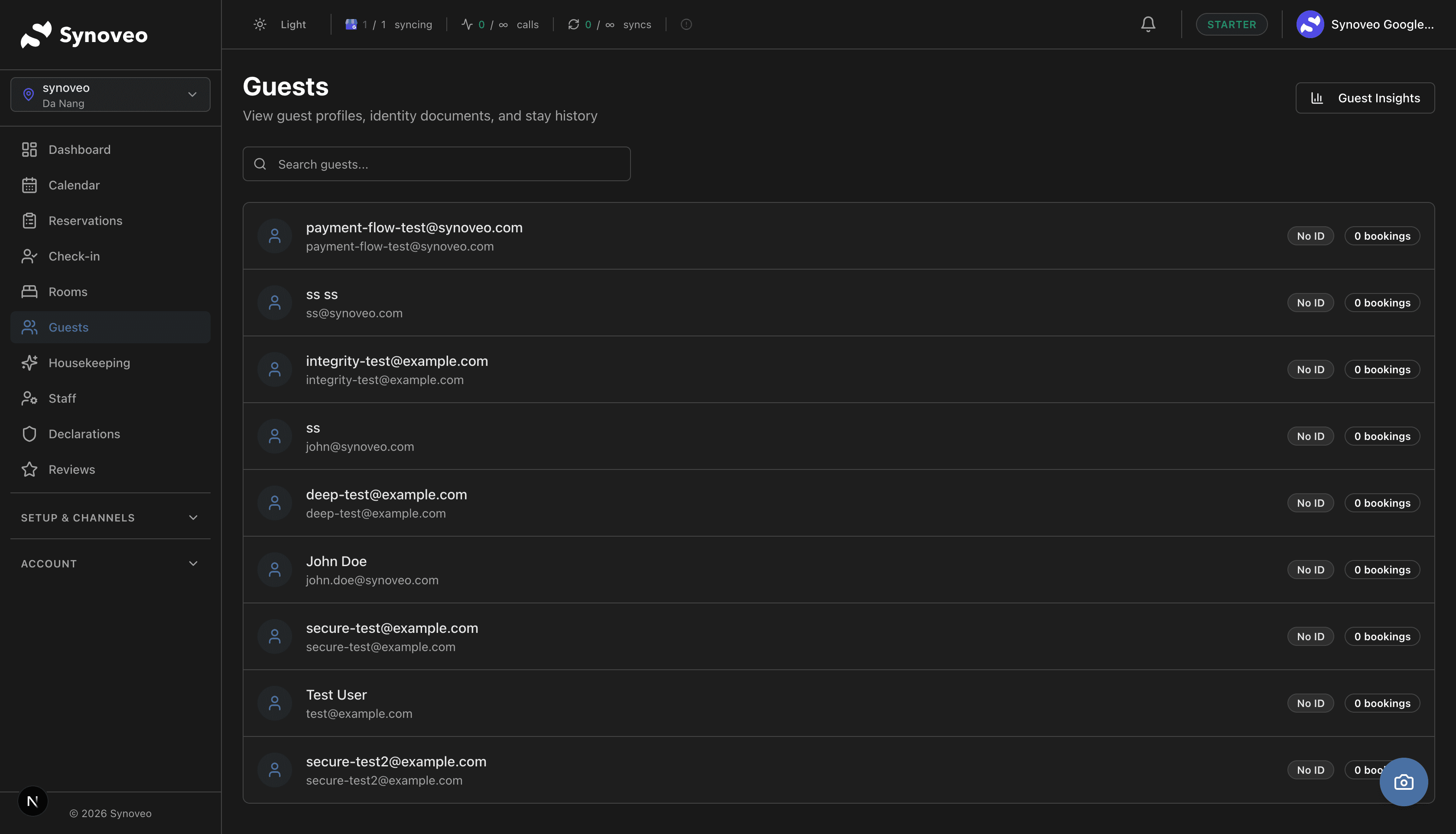
What You See
Each guest entry shows:
- Name and email -- primary contact information
- Repeat Guest badge -- shown for guests with 2 or more stays
- ID Verified badge -- shown when identity documents have been captured
- Booking count -- total number of bookings for this guest
- Last stay date -- when they last visited your property
Searching and Filtering
Find guests quickly using:
| Filter | Options |
|---|---|
| Search | Name, email address, or phone number |
| Guest type | First-time, returning (2+), frequent (5+) |
| Booking source | Booking.com, Airbnb, Direct, Walk-in |
| ID status | Verified, not verified |
Guest Profiles
Click on any guest to view their full profile. Each profile contains several sections:
Personal Information
- Full name
- Email address
- Phone number
- Date of birth
- Nationality
- Home address
- ID or passport details (stored securely)
Guest data is stored securely and in compliance with privacy regulations. Sensitive information like passport numbers is encrypted at rest.
Stay History
A complete record of every stay at your property:
| Stay | Check-in | Check-out | Room | Rate Plan | Total |
|---|---|---|---|---|---|
| 3 | Sep 12, 2025 | Sep 15, 2025 | Suite 201 | Standard | $540 |
| 2 | Jun 3, 2025 | Jun 5, 2025 | Double 105 | Early Bird | $180 |
| 1 | Feb 18, 2025 | Feb 21, 2025 | Double 103 | Standard | $330 |
Click on any stay to see the full reservation details for that visit, including the pricing breakdown, special requests, and any notes your team added.
Preferences and Notes
Track what you know about each guest to deliver better service:
- Room preferences -- quiet room, high floor, specific room number, garden view
- Pillow type -- soft, firm, hypoallergenic
- Dietary requirements -- allergies, vegetarian, vegan
- Special occasions -- birthday, anniversary dates
- General notes -- any other information your team should know
Adding preferences pays off when guests return. A simple note like "prefers room 205 with garden view" turns a good stay into a memorable one.
Identity Documents
During check-in, you can capture guest identity documents:
- Passport
- National ID card
- Driver's license
- Residence permit
Documents are stored securely and linked to the guest profile. They are used for police declarations (where required by local regulations) and can be accessed from the guest's profile page.
Police PDF
For guests who have completed identity verification, you can generate a police-format PDF from their profile. This document includes the guest's personal information, document details, and stay information in the format required by local authorities.
Automatic Guest Creation
Guest profiles are created automatically from several sources:
| Source | What Happens |
|---|---|
| Channel booking | Profile created from Booking.com, Airbnb, or Expedia booking data |
| Direct booking | Profile created from your website booking form |
| Walk-in | Profile created during the check-in registration process |
| Manual entry | You create a profile manually from the Guests page |
Duplicate Detection
When a new booking arrives, Synoveo checks if the guest already exists by matching:
- Email address (primary match)
- Phone number (secondary match)
- Full name + nationality (tertiary match)
If a match is found, the new booking is linked to the existing guest profile rather than creating a duplicate.
Merging Duplicate Profiles
If duplicates are created (e.g., a guest uses different email addresses on different bookings), you can merge them:
- Open one of the duplicate profiles
- Click Merge with Another Profile
- Search for the other profile
- Review the combined information
- Confirm the merge
Merging guest profiles cannot be undone. Review the details carefully before confirming.
Guest Insights
Access Guest Insights from the button in the top-right corner of the Guests page. This view provides analytics about your guest base:
Key Metrics
- Total guests -- how many unique guests have stayed at your property
- Repeat guest rate -- percentage of guests who have visited more than once
- Average booking value -- typical revenue per reservation
- Top countries -- where your guests come from
Guest Segments
Synoveo automatically categorizes guests:
| Segment | Definition |
|---|---|
| First-time | Have stayed once |
| Returning | Have stayed 2-4 times |
| Frequent | Have stayed 5 or more times |
| High-value | Top 10% by total revenue |
| Recent | Stayed within the last 90 days |
These segments help you identify your most valuable guests and spot opportunities to encourage return visits.
Guest Communication
Pre-Arrival Messages
Send information to guests before they arrive:
- Check-in instructions and directions
- Local area recommendations
- Property policies and amenities information
- Online check-in link
During Stay
Communicate with guests during their stay:
- Welcome messages
- Wi-Fi information and property guides
- Event or activity notifications
Post-Stay
Reach out after a guest departs:
- Thank-you messages
- Feedback and review requests
- Invitations to book again
All guest communication is logged in the guest profile so your entire team can see the conversation history.
Privacy and Data Protection
Synoveo takes guest privacy seriously:
- Encryption -- sensitive data (passport numbers, payment details) is encrypted at rest
- Access control -- only authorized staff can view guest information based on their role
- Data retention -- configure how long guest data is kept according to your local regulations
- Guest requests -- handle data access or deletion requests in compliance with privacy laws
Best Practices
- Keep profiles current. Update contact information when guests provide new details at check-in.
- Record preferences. Even small notes about guest preferences significantly improve their next visit.
- Merge duplicates regularly. Review and clean up duplicate profiles to maintain an accurate database.
- Use insights. Focus extra attention on frequent and high-value guests to encourage loyalty.
- Respect privacy. Only collect information that is necessary and handle it according to local regulations.
- Complete ID verification. Capturing identity documents during check-in saves time on police declarations later.