Review Management
Monitor and respond to guest reviews from Google and booking sites in one place
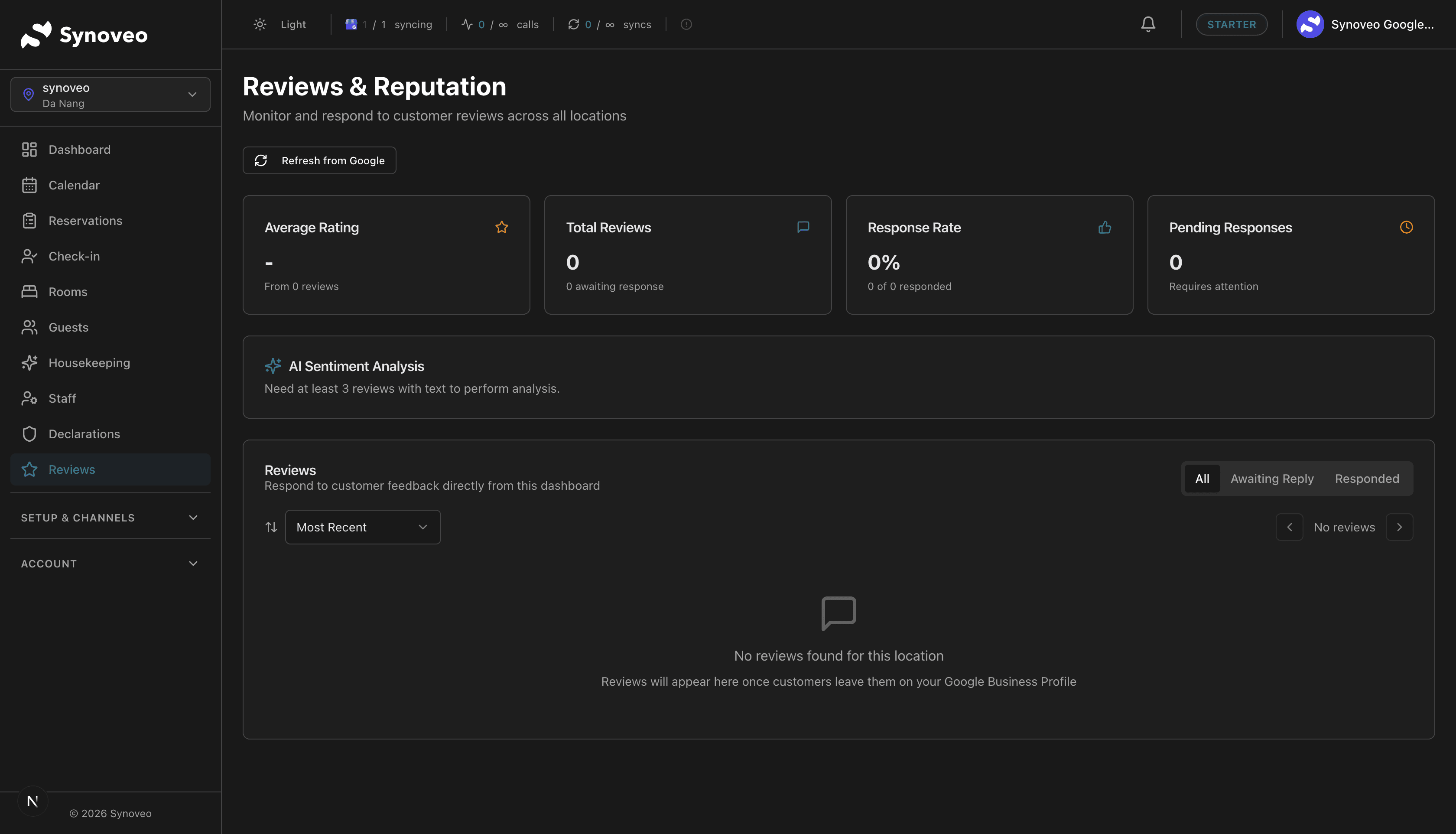
Guest reviews are among the most powerful factors in a traveler's booking decision. Synoveo brings reviews from Google, Booking.com, and Airbnb into a single dashboard so you can monitor and respond without logging into multiple platforms.
Why Reviews Matter
For lodging businesses, reviews directly impact your bottom line:
- 93% of travelers read reviews before booking accommodation
- Properties with higher ratings command higher nightly rates
- Recent, positive reviews improve your Google search ranking
- Responding to reviews builds trust with future guests
Even a 0.1 improvement in your average rating can significantly increase booking inquiries. Consistent review management pays off.
Unified Review Dashboard
Instead of checking Google, Booking.com, and Airbnb separately, Synoveo shows all your reviews in one place.
Review sources
| Source | Features | Update Frequency |
|---|---|---|
| View and respond | Every 6 hours | |
| Booking.com | View and respond | Every 6 hours |
| Airbnb | View and respond | Every 6 hours |
What you see for each review
- Guest name and profile (where available)
- Star rating (or equivalent score)
- Review text -- What the guest wrote
- Date -- When the review was posted
- Source -- Which platform it came from
- Response status -- Whether you've replied yet
Viewing Your Reviews
Filtering and sorting
You can filter reviews by:
- Source -- Google only, Booking.com only, Airbnb only, or all
- Rating -- Show only 5-star, only negative, etc.
- Response status -- Unreplied reviews, replied reviews
- Date range -- Recent reviews, last month, custom range
Review summary
At the top of the reviews page, you'll see:
- Overall rating -- Your average across all sources
- Total reviews -- How many reviews you have
- Rating breakdown -- Distribution across star ratings (how many 5-star, 4-star, etc.)
- Response rate -- Percentage of reviews you've responded to
Responding to Reviews
Responding to reviews shows guests (current and future) that you care about their experience.
Find the review
In the reviews dashboard, locate the review you want to respond to. Unreplied reviews are highlighted for easy identification.
Write your response
Click Reply and write your response. Be professional, grateful, and specific.
Publish your reply
Click Send. Your response is posted to the original platform (Google, Booking.com, or Airbnb) where the review was left.
Responding to positive reviews
| Do | Don't |
|---|---|
| Thank the guest by name | Send a generic "Thanks for your review" |
| Reference something specific they mentioned | Copy-paste the same reply for everyone |
| Invite them to return | Be overly promotional |
| Keep it brief and warm | Write a lengthy response |
Example:
"Thank you, Sarah! We're so glad you enjoyed the garden view room and our homemade breakfast. The sourdough pancakes are a guest favorite! We'd love to welcome you back anytime."
Responding to negative reviews
| Do | Don't |
|---|---|
| Acknowledge the issue | Be defensive or dismissive |
| Apologize sincerely | Blame the guest |
| Explain what you've done to improve | Make excuses |
| Offer to make it right (offline) | Argue publicly |
| Stay professional and calm | Get emotional or sarcastic |
Example:
"Thank you for your feedback, James. We're sorry the room wasn't to the standard you expected. We've addressed the housekeeping issue you mentioned and our manager would like to discuss this with you directly. Please contact us at [email] -- we want to make this right."
Respond to negative reviews within 24-48 hours. A thoughtful, quick response shows future guests that you take feedback seriously.
Review Analytics
Track your review performance over time:
Key metrics
| Metric | What It Tells You |
|---|---|
| Average rating trend | Is your rating improving or declining? |
| Review volume | Are you getting more reviews over time? |
| Response rate | What percentage of reviews have you responded to? |
| Response time | How quickly do you typically respond? |
| Sentiment breakdown | Common positive and negative themes |
Rating by source
Compare how guests rate you across different platforms. If your Booking.com rating is lower than Google, it may indicate different guest expectations on that platform.
Getting More Positive Reviews
More reviews (and better reviews) improve your visibility and booking rate. Here are proven strategies:
During the stay
- Deliver great experiences -- This is the foundation of good reviews
- Address issues immediately -- Don't wait for the review to find out about a problem
- Personal touches -- A welcome note, a local tip, or remembering a returning guest goes a long way
After checkout
- Ask for a review -- A friendly email thanking the guest and including a review link
- Make it easy -- Provide direct links to your Google or booking site review page
- Time it right -- Send the request 1-2 days after checkout while the stay is still fresh
What NOT to do
- Never offer incentives for reviews (discounts, freebies) -- this violates platform policies
- Never pressure guests to leave reviews
- Never create fake reviews
- Never ask guests to remove or change a negative review
Google and booking sites can detect and penalize properties that engage in fake or incentivized reviews. Focus on genuine guest experiences.
Review Response Templates
While every response should feel personal, having templates as starting points saves time:
Positive review template
"Thank you so much, [Name]! We're delighted to hear you enjoyed [specific detail]. Our team works hard to [relevant effort], and it means a lot when guests notice. We hope to see you again soon!"
Neutral review template
"Thank you for staying with us, [Name], and for sharing your feedback. We're glad you enjoyed [positive aspect]. Regarding [concern], we appreciate you bringing this to our attention and we're [action taken]. We hope to welcome you back for an even better experience."
Negative review template
"Thank you for your feedback, [Name]. We sincerely apologize for [specific issue]. This is not the experience we aim to provide. We've [corrective action]. We would welcome the opportunity to discuss this further -- please reach out to us at [contact]. We want to make this right."
Best Practices Summary
- Respond to every review -- Yes, even the positive ones
- Reply within 48 hours -- Faster responses show guests you're engaged
- Be specific -- Reference details from the guest's review
- Stay professional -- Especially with negative reviews
- Monitor regularly -- Check your reviews dashboard at least weekly
- Look for patterns -- If multiple guests mention the same issue, address it
- Ask happy guests to review -- A gentle post-checkout email works well