Managing Your Google Listing
Keep your Google Business Profile accurate and optimized through Synoveo
Your Google Business Profile is one of the first things potential guests see when they search for accommodation. Synoveo keeps your listing accurate, up to date, and optimized for search visibility.
What Is Google Business Profile?
Google Business Profile (GBP) is your property's free listing on Google. It appears in Google Search results, Google Maps, and the local pack when people search for accommodation in your area.
Your Google listing shows:
- Property name, address, and phone number
- Photos of your property
- Guest reviews and ratings
- Operating hours
- Website link
- Booking options
- Amenities and attributes
Synoveo acts as your Google listing manager -- you make updates in Synoveo, and changes are pushed to Google automatically.
How Synoveo Keeps Your Listing Updated
Synoveo works as the central hub for your property information. When you update something in Synoveo, the change is pushed to Google.
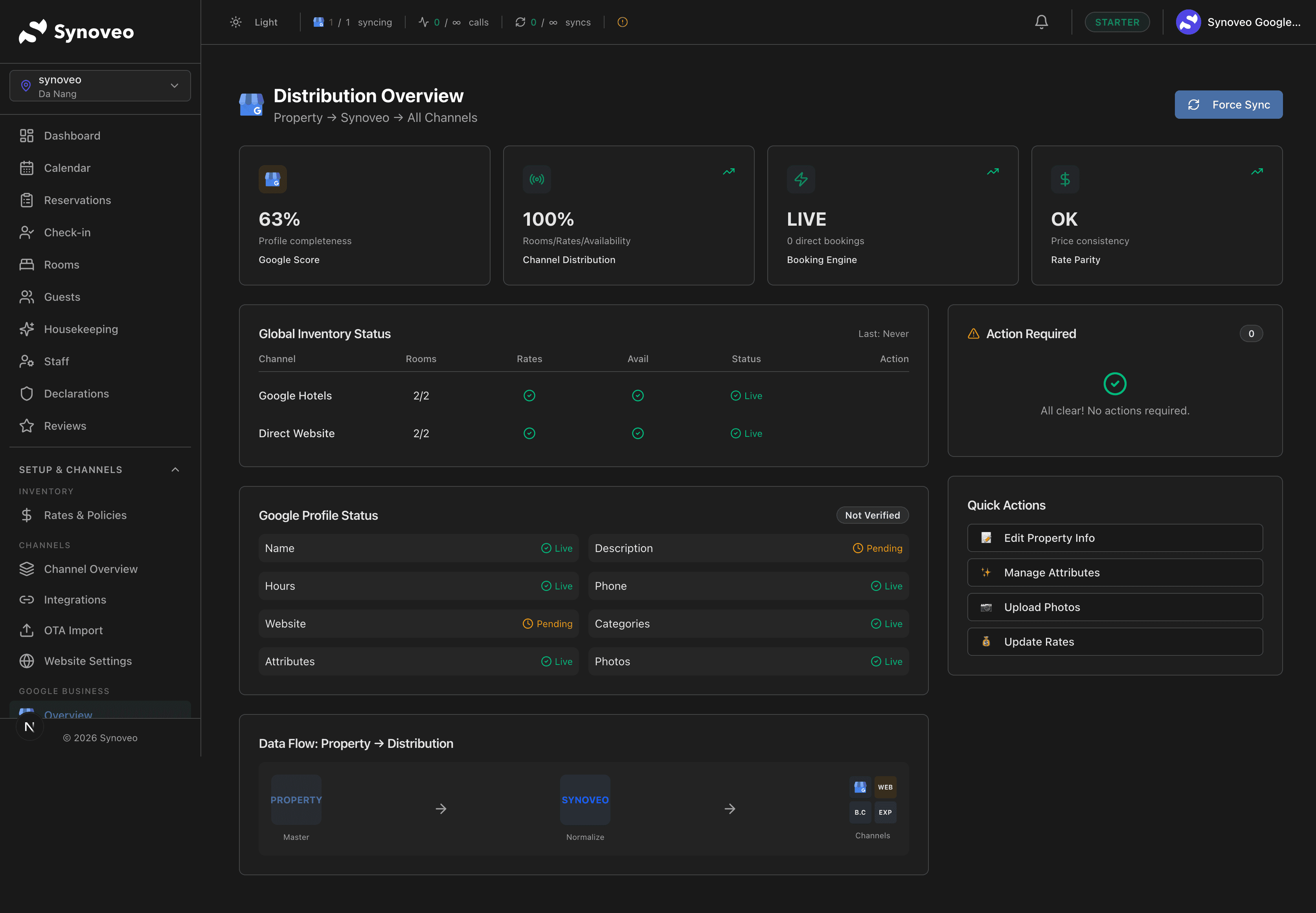
The update flow
You edit in Synoveo
        |
        v
Synoveo stores the update
        |
        v
Changes push to Google
        |
        v
Your Google listing is updated
What Synoveo manages on Google
| Category | Fields |
|---|---|
| Basic info | Property name, address, phone, website |
| Description | Business description and short description |
| Hours | Regular hours, special hours, holiday hours |
| Categories | Primary and additional business categories |
| Attributes | Amenities, services, accessibility, payments accepted |
| Photos | Cover photo, logo, interior, exterior, rooms |
Always make profile changes through Synoveo rather than directly on Google. Changes made on Google may be overwritten the next time Synoveo syncs.
Editing Your Business Information
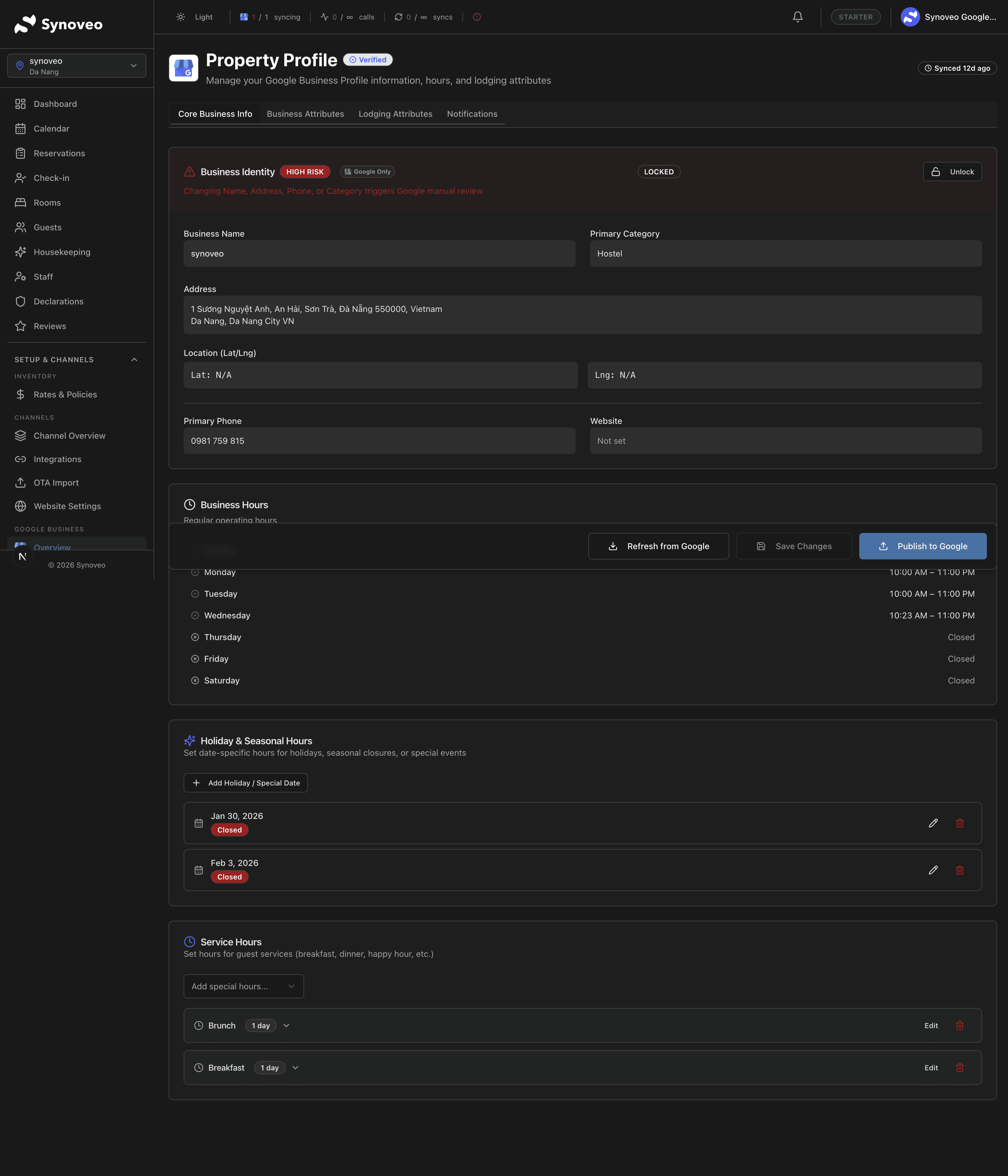
Basic details
Open your property profile
In the Synoveo console, go to Google Presence and select your location.
Edit the fields you want to update
Click on any field to modify it. Common updates include:
- Property name
- Phone number
- Website URL
- Business description
Save and publish
Click Save. Synoveo validates your changes and pushes them to Google. Updates typically appear on Google within a few hours.
Business description
Your business description is a key part of your Google listing. It appears in search results and helps guests understand what your property offers.
Tips for a great description:
- Start with your property type and location ("Boutique bed and breakfast in the heart of downtown Portland")
- Highlight what makes you unique (historic building, waterfront views, award-winning breakfast)
- Mention nearby attractions guests care about
- Include relevant keywords naturally (don't stuff keywords)
- Keep it under 750 characters for optimal display
Operating hours
Set your front desk or reception hours:
- Regular hours -- Your standard weekly schedule
- Special hours -- Seasonal changes or temporary adjustments
- Holiday hours -- Hours for specific holidays
For hotels and B&Bs, "hours" typically means front desk or check-in availability. Set these to when your reception is staffed or when guests can check in.
Managing Photos on Google
Photos are one of the most important parts of your Google listing. Properties with more high-quality photos get significantly more engagement.
Photo categories
| Category | What to Upload | Recommended Count |
|---|---|---|
| Cover photo | Your best overall property shot | 1 |
| Logo | Your property logo | 1 |
| Exterior | Building facade, entrance, signage | 3-5 |
| Interior | Lobby, common areas, dining area | 5-8 |
| Rooms | Each room type, different angles | 3-5 per type |
Photo guidelines
- Resolution: At least 720px wide (larger is better)
- Format: JPG or PNG
- Quality: Well-lit, in focus, no heavy filters
- Content: Show your property as guests will experience it
- Seasonal: Update photos seasonally if your property looks different in summer vs. winter
Uploading photos through Synoveo
- Go to Google Presence > Photos
- Click Upload Photos
- Select the photo category
- Drag and drop or browse for your images
- Add captions (optional but recommended)
- Synoveo uploads them to your Google listing
Business Attributes and Categories
Categories
Your primary category tells Google what type of property you are:
- Hotel
- Bed and breakfast
- Inn
- Hostel
- Vacation rental
- Resort
You can also add secondary categories (e.g., "Event venue" if you host weddings).
Choose your primary category carefully. It directly affects which searches your property appears in.
Attributes
Attributes are the amenities and features that appear on your Google listing. They help guests filter search results and decide whether your property is right for them.
Common lodging attributes:
| Category | Examples |
|---|---|
| Room features | Air conditioning, Wi-Fi, TV, minibar |
| Property amenities | Pool, parking, gym, restaurant |
| Services | Room service, laundry, airport shuttle |
| Accessibility | Wheelchair accessible, elevator |
| Payment | Credit cards accepted, contactless payment |
| Policies | Pet-friendly, smoking policy |
Synoveo shows you all available attributes for your category and lets you set them from one place.
Conflict Detection
Sometimes Google or third parties make changes to your listing without your knowledge. Synoveo monitors for these unauthorized changes.
How it works:
- Synoveo periodically checks your Google listing
- If something changed that you didn't update, Synoveo flags it
- You review the change and decide whether to keep it or revert to your version
Common causes of unauthorized changes:
- Google's automated updates from web data
- User-suggested edits on Google Maps
- Google's review of your listing content
Review flagged changes promptly. If someone suggested an incorrect address or phone number, you'll want to correct it before guests see wrong information.
Best Practices
- Keep information current -- Update hours for holidays, seasonal changes, and renovations
- Add fresh photos regularly -- Google favors listings with recent photo activity
- Complete every field -- A complete profile ranks higher and converts more guests
- Monitor for changes -- Check the conflict detection alerts regularly
- Write for guests -- Your description should be helpful, not keyword-stuffed