Channel Manager
Distribute your rooms and rates across booking sites automatically
A channel manager keeps your property listed on multiple booking sites at once, with availability and pricing always in sync. Synoveo includes a built-in channel manager so you can reach more guests without the risk of overbookings.
What Is a Channel Manager?
When you list your property on Booking.com, Airbnb, Expedia, and your own website, you need a way to keep everything consistent. If a guest books your last room on Booking.com, that room needs to disappear from Airbnb instantly, or you end up with a double booking.
A channel manager solves this by acting as a central hub:
- You set your rooms, rates, and availability in one place (Synoveo)
- The channel manager pushes updates to every connected booking site automatically
- When a booking comes in from any channel, availability updates everywhere in real time
Synoveo's channel manager is powered by Channex, an industry-leading distribution platform trusted by thousands of properties worldwide.
How It Works
Your Property in Synoveo
        |
        v
  Channel Manager
   /    |    \     \
  v     v     v     v
Booking  Airbnb  Expedia  Your
 .com                    Website
Set up your rooms and rates
Configure your room types, base prices, and availability in the Synoveo console. This is your single source of truth.
Connect your booking sites
Link the channels where you want to list your property. Each connection maps your Synoveo rooms to the corresponding listings on that site.
Automatic synchronization
When you change a rate or close dates, the update pushes to all connected channels within minutes. When a booking arrives, availability adjusts everywhere.
The Channel Overview
Your channel dashboard gives you a bird's-eye view of all your distribution:
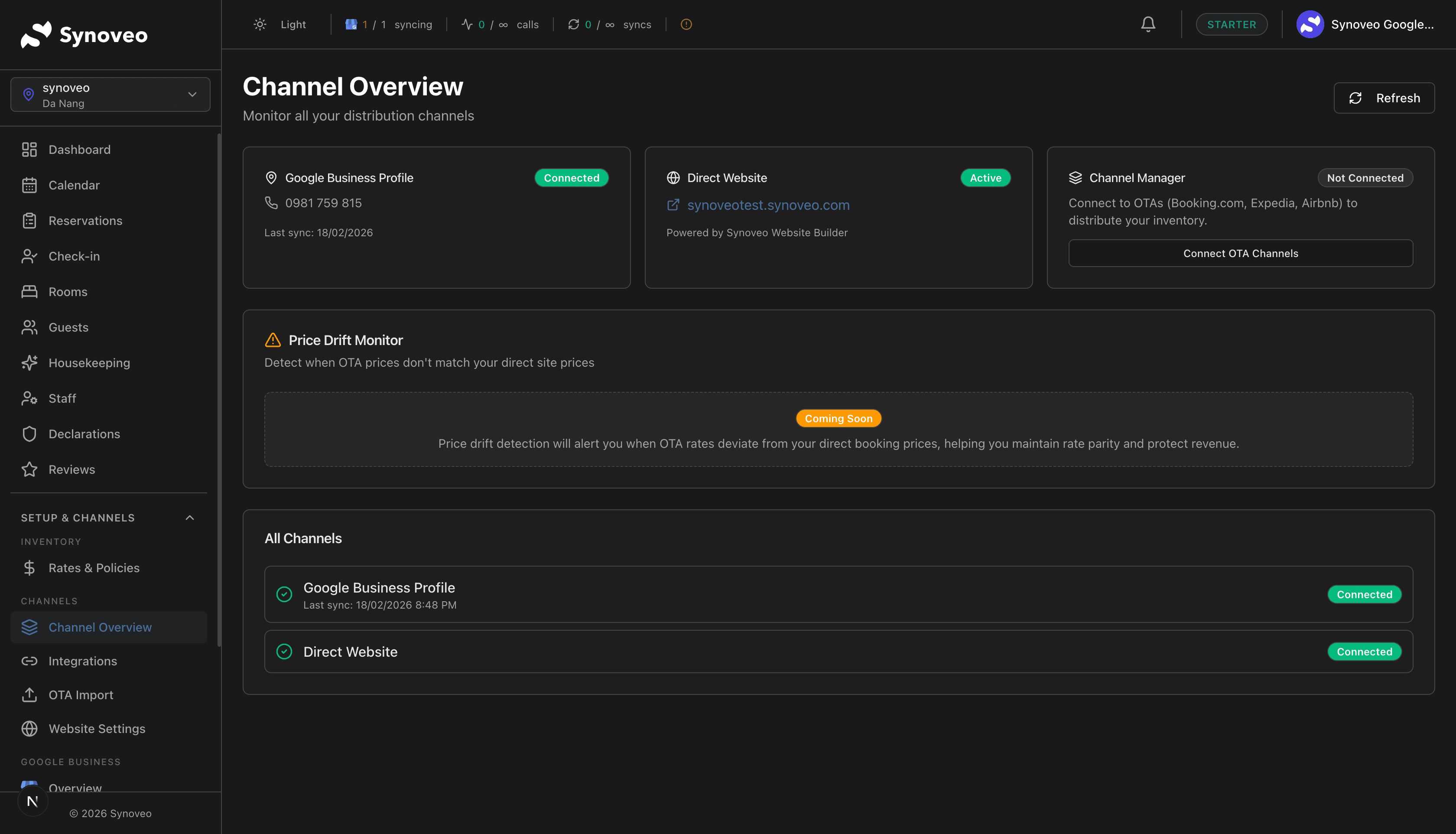
What you'll see:
| Section | Description |
|---|---|
| Connected channels | Each booking site you've linked, with connection status |
| Sync status | Whether each channel is up to date or has pending changes |
| Recent activity | Latest bookings and rate updates sent to channels |
| Room mapping | How your Synoveo rooms map to listings on each site |
Rate and Availability Sync
The channel manager synchronizes three key pieces of data:
Rates
When you update a price in Synoveo, the new rate pushes to all connected booking sites. You can also set channel-specific rate adjustments if you want different prices on different sites.
Availability
Room availability updates automatically when:
- A new booking comes in (from any channel)
- You manually close or open dates
- You change the number of rooms available
Restrictions
Minimum stay, maximum stay, and closed-to-arrival rules sync to channels that support them.
Changes typically reach booking sites within 2-5 minutes. During peak booking periods, this speed helps prevent double bookings.
Avoiding Overbookings
Overbookings are the biggest risk when listing on multiple sites. Synoveo's channel manager protects you in several ways:
- Real-time updates -- When a booking arrives, availability adjusts on all channels within minutes
- Inventory pooling -- All channels draw from the same pool of rooms, so you never accidentally list more rooms than you have
- Booking confirmation -- Each booking is verified and logged before availability is released
- Sync monitoring -- The dashboard alerts you if a channel falls out of sync
If you also manage availability directly on a booking site (outside of Synoveo), you risk conflicts. For best results, make all changes through Synoveo and let the channel manager handle distribution.
Supported Booking Sites
Synoveo connects to major booking platforms:
| Channel | Type | Features |
|---|---|---|
| Booking.com | Major OTA | Rates, availability, restrictions, content |
| Airbnb | Vacation rental | Rates, availability, content |
| Expedia | Major OTA | Rates, availability, restrictions |
| TripAdvisor | Metasearch + booking | Rates, availability |
| Amadeus | GDS (travel agents) | Rates, availability |
| Direct booking | Your own website | Commission-free bookings |
Channel Manager vs. Manual Updates
| Aspect | Manual Management | With Channel Manager |
|---|---|---|
| Update speed | Minutes to hours per site | All sites updated at once |
| Overbooking risk | High | Very low |
| Time spent | Hours per week | Minutes per week |
| Rate consistency | Prone to mistakes | Always in sync |
| New channel setup | Start from scratch | Connect and map rooms |
Getting Started
To start distributing your property:
- Make sure your rooms are set up in Synoveo
- Configure your rates and availability
- Connect your first booking site (we recommend starting with one, then adding more)